
Mileage and visit dates
Compare recorded odometer readings and dates with the advert, invoices and MOT history. Confirm the reading’s unit before comparing miles and kilometres.
An Audi Service History Check shows recorded Audi servicing by VIN, including available odometer readings, visit dates, inspections, repairs, reported faults, campaigns and bodywork entries. You receive a PDF report for the specific VIN with the available dealer records, vehicle details and factory equipment data.
Enter the 17-character VIN in the report store before adding the report to your basket.

The available records describe a particular vehicle, not a guaranteed number of entries for every Audi.
Compare recorded odometer readings and dates with the advert, invoices and MOT history. Confirm the reading’s unit before comparing miles and kilometres.
Read recorded inspections, oil changes, brake-fluid services, filter work and mechanical repairs. The detail depends on the entries available for that VIN.
Separate a reported symptom from the workshop diagnosis and completed work. A visit or invoice row is not automatically another scheduled service.
Available entries may identify replaced body panels, headlights or other bodywork operations. A repair entry alone does not establish its cause or the present condition.
Technical details, factory equipment and campaign information may be supplied where recorded. Read the status and wording of each entry.
Compare dates, readings and supporting invoices. Missing records or a lower reading require explanation; they do not alone establish skipped maintenance or odometer fraud.
Vehicle details and factory equipment supplement the service records; they do not confirm the car’s present condition.
The supplied type 8K5 report includes two invoice entries dated 17 September 2018 at a recorded reading of 45,325.
Read the bodywork example → Download the example guide PDFThe source lists replacement of a front bumper cover, headlight, front wing and bonnet. Removal and refitting are recorded separately.
The entry does not establish why the work was needed, the extent of any damage, repair quality or the vehicle’s current condition.
A report complements invoices, inspection and a test drive.
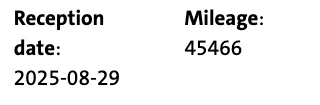
Three different genuine anonymised source extracts: two from the existing Audi examples and a supplementary dated reading shown by the report store. Click any image to read it at full size.
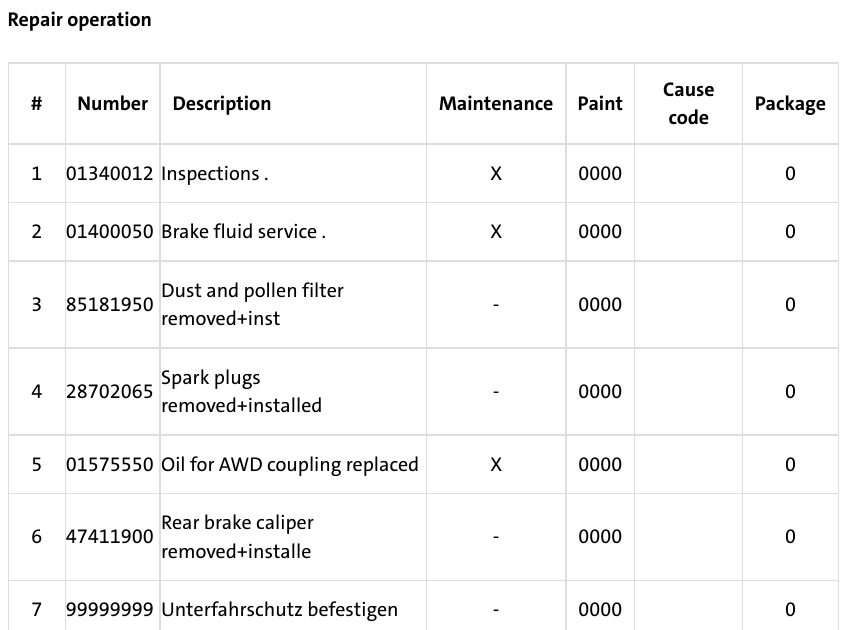
Actual anonymised Audi TT source table. The date and reading are described in the case study; no unit is assumed.
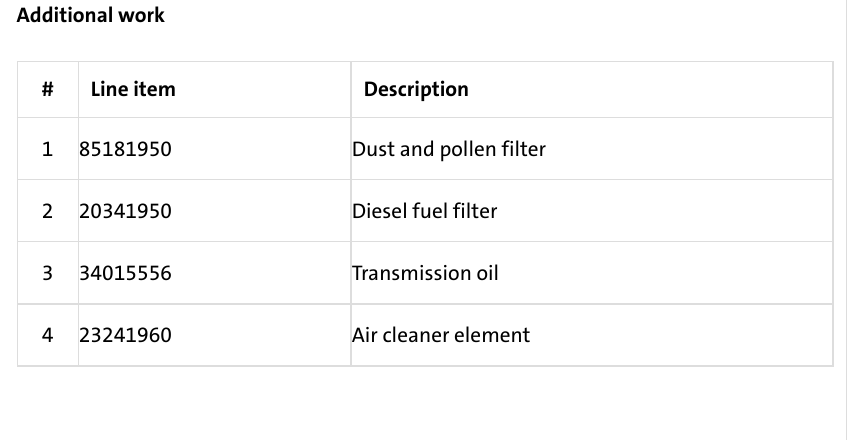
A different source table lists additional maintenance items. Workshop codes are operation identifiers, not customer details.
 03
A supplementary anonymised source example displayed by the report store. It records 29 August 2025 and 45,466; the mileage unit is not shown.
Four original reports are discussed in the case study; the third gallery image is a separate supplementary source extract.
Download anonymised example guideTake the 17-character VIN from the vehicle or its documents. Match both before ordering.
Open the linked report store, enter the VIN in its required field, then add the Audi report to your basket and complete the order.
Usually within 2 hours; processing can take up to 12 hours. Delivery deadline: 24 hours after payment confirmation.
Compare entries with invoices, the free MOT history, inspection and a test drive. Confirm miles or kilometres before comparing readings.
Use dealer records, official MOT history and invoices together.
The 17-character vehicle identification number identifies the specific car. It connects vehicle details and available workshop records to that vehicle; reading the identifier alone does not reveal every service or repair.
Read all 17 characters as one identifier. A registration number, a model badge and an engine code serve different purposes and are not substitutes for the VIN. Ask for clarification if the number on the vehicle differs from its documents.
Read the VIN from the vehicle and compare it with the V5C and other documents. Locations vary by model; use the vehicle handbook.
Use the recorded workshop work for maintenance evidence, the official MOT history for test results and readings, and invoices to identify particular jobs and parts. No single source should be treated as a complete substitute for the others.
Keep each recorded reading with its date and unit. The displayed Audi source extracts do not independently establish whether the readings are miles or kilometres.
Available vehicle and factory equipment data can help compare the advertised configuration with the recorded build. It does not confirm that equipment still works or that later modifications appear in the factory record. Confirm the available detail for the specific VIN.
A UK registration number is useful for checking MOT history. The 17-character VIN identifies the exact vehicle for this service history report.
Coverage depends on the car and the systems where work was recorded. Ask for overseas paperwork and invoices for work outside the accessible record.
Keep production information, the model year and the date of first registration separate when comparing documents. Do not substitute an assumed year from a badge for the vehicle details, or assume that the first visible workshop entry marks the start of the car’s life.
Compare a seller’s servicing claims with recorded work, identify questions about missing intervals and prepare a focused inspection. A documented repair does not by itself establish current condition, and a long record does not replace a test drive or mechanical assessment.
| Source | Useful for | Limit |
|---|---|---|
| Audi digital record | Recorded maintenance dates, readings and tasks | Depends on which work was entered and accessible |
| GOV.UK MOT history | Test results, advisories and recorded mileage | Does not document routine servicing |
| Garage invoices | Specific work, parts and payment evidence | May be missing, incomplete or hard to verify |
MOT history is not Audi service history. MOT records show roadworthiness tests, advisories and recorded mileage; they do not prove that routine maintenance was performed.
If you want to compare a seller’s account with available dealer entries, check the Audi service history report by VIN.
Read the full free Audi checking guide →Sources: Audi UK servicing and GOV.UK MOT history.
A1, A3, A4, A5, A6, A7, A8, Q3, Q5 and TT: the VIN and available recorded work determine the result, not the model badge.
We show extracts from genuine supplied reports and identify their limits. Separate digital schedule, invoice, repair and warranty entries; match the vehicle, dates, readings and work recorded.
Missing entry does not mean missing service. Work by an independent garage may be supported by separate invoices. Conversely, a recorded visit does not establish the vehicle’s current condition.
See the method in four Audi examples →Customer feedback on the Audi report.
Wanted to check the service records before travelling to view an A4 Avant. The report was easy to follow and helped me prepare a few questions for the seller.
Quick and trustworthy.
Ordered late evening and still received the report quickly. Reliable and straightforward.
Simple process, quick delivery and detailed report. Worth every penny.
Yes. Match the 17-character VIN against the car and its documents. Enter it in the linked report store before adding the report to your basket.
A UK registration number is useful for public MOT history and vehicle identification, but this Audi service report is ordered using the 17-character VIN. MOT history is not the same as service history: MOT records show tests, advisories and mileage, not routine servicing or maintenance.
No. A digital service schedule can show recorded servicing and additional tasks. Other workshop, warranty or invoice entries may exist separately, and an independent garage’s work may be missing if it was not added to the digital record. Always ask for invoices as well.
No. MOT tests record roadworthiness results, advisories and an odometer reading at each test. They do not prove that oil, filters, brake fluid or gearbox servicing was performed.
It is a gap in the evidence, not proof that a service never happened. Ask for an invoice from the garage, check whether an Audi Centre can confirm the entry, and assess the maintenance schedule for that exact model and engine.
The Audi report costs £19. Usually within 2 hours; processing can take up to 12 hours. Delivery deadline: 24 hours after payment confirmation.
The linked product offers a full refund if no authorised dealer data is available. Read its terms before checkout; a partial history is different from no data.
Coverage depends on the car and the systems where previous work was recorded. Do not assume a UK report contains all overseas visits. Ask for original overseas invoices and clarify the available record before paying for a check.
No. First check the date, the unit and the source document. A correction, transcription error or different unit may explain a difference. A lower reading is a reason to ask questions, not proof on its own.
No. Available vehicle details and factory equipment fields vary by VIN and source. Check the supplied specification against the car; it does not prove that later modifications are factory equipment or that every feature still works.
Available dealer records may include servicing or repairs for hybrid and electric Audi vehicles. Coverage depends on the specific VIN and records available. Service entries do not replace a traction-battery condition assessment.
£19 per report. PDF by email, usually within 2 hours. Enter your VIN in the report store before adding to basket.